Google

Two Things You Can’t Ignore: Landing Pages and Quality Score

I am quite certain some of our clients, and others who take advantage of advertising using Google Ads, wonder why we frequently talk about landing pages and quality score. Well, they are simply two things you can’t ignore!

The experts at Google and elsewhere write about understanding the landing page experience, and it is important to know what they say about it. It is also important for anyone wanting to maximize their investment in Google Ads to use the advice they offer.

It today’s AI search world, landing page success relies heavily on message match. If a user searches for “same-day emergency dental implants,” your ad should say it, and your landing page headline must immediately echo it. When a page immediately validates the user’s intent above the fold, bounce rates plummet, and trust goes up.

How Landing Pages Dictate Quality Score

Your landing page accounts for a massive portion of your Quality Score evaluation. Google judges your Landing Page Experience based on concrete technical and behavioral indicators:

  • Mobile-First Design & Speed: Google places severe weight on mobile responsiveness and page load times. A single-second delay in mobile load time can drop conversions by up to 20%. If your page is slow, your landing page experience rating drops to “Below Average,” tanking your overall score.
  • Transparency and Trust: The page must clearly feature privacy policies, clear pricing/terms, contact information, and security signals (like reviews or certifications).
  • User Engagement: If users consistently click your ad and instantly hit the “Back” button to return to the search results page (known as pogo-sticking), Google notes that your page failed to answer their query.

What is Quality Score and Why it Matters: 

Quality Score (QS) is a 1-to-10 diagnostic rating Google assigns to your keywords. It measures how relevant and helpful your ad and landing page are to someone performing a search. It is determined by three core components:

  • Expected Click-Through Rate (CTR): The likelihood that users will click your ad.
  • Ad Relevance: How closely your ad text matches the intent behind a user’s search query.
  • Landing Page Experience: The value, speed, and clarity your website provides once they click.

The Financial impact: The “Quality Score Discount” 

Quality Score directly dictates your Ad Rank and your Cost Per Click (CPC). Google penalizes low-quality experiences and rewards highly relevant ones. If you have a poor Quality Score, you pay a steep penalty (Google calls it a Premium)  for traffic; if it’s high, you get a massive discount.

  • Rank: 10/10 ~50% Discount
  • Rank: 5/10 Baseline (No discount / no penalty)
  • Rank 1/10 400% Penalty

A low “Quality Score” forces you to over-bid just to maintain visibility, effectively bleeding your ad budget dry.

To succeed in today’s rapidly changing search world,  you can’t treat your landing pages as an afterthought to your keyword strategy.

Here is more from Google on Quality Score.

Don’t forget. When it comes to Google Ads campaigns,  there are “Two Things You Can’t Ignore: Landing Pages and Quality Score.”

P.S. Creating every page on your website with landing page experience in mind will serve you well in organic searches as well.
The Google Business Profile Is Critical for Businesses

If you do not already know, Google Business Profile is a free tool for businesses and organizations to manage their online presence across Google, including Search and Maps.

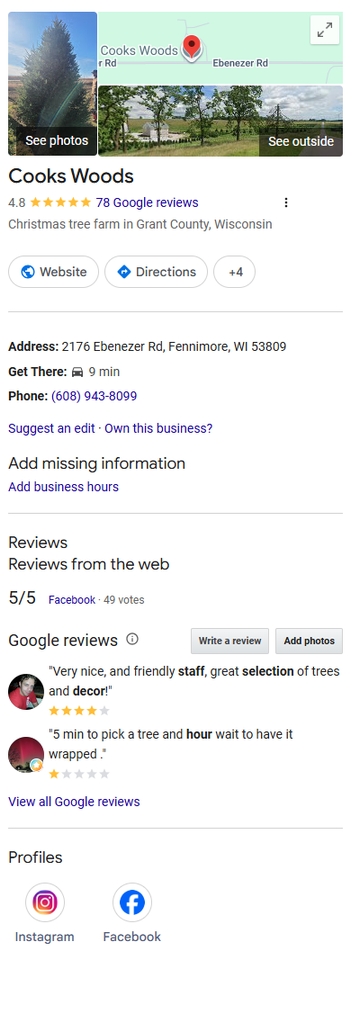
Cooks Woods Google Business Profile image"Claiming or improving your Google Business Profile is the singular, most important step you can take for your local business if you want to maximize results from Google Search." I wrote a version of that statement years ago, and it is still true today.
The concept is not new. Back in 2008, I wrote about using Google Maps Local Business Center to increase local traffic. Since then, the name has changed several times. What many of us knew as Google My Business is now Google Business Profile, and it has become one of the most important online marketing tools available to local businesses.

Since 2008, its name has changed several times and Google Business Profile is much more robust than it was back then. In 2008, there were roughly 173 million websites online. As I write this, there are over 1.9 "Billion" websites worldwide, with roughly 200 million active or maintained websites competing for attention. That makes prominent visibility in Google Search and Google Maps more valuable than ever.

A complete and accurate Google Business Profile gives your business a better opportunity to appear when people are searching for what you offer, especially when they are searching locally.

Manage your information:

First, it is imperative to claim and verify your Google Business Profile. If you have not done so, start at google.com/business.

Once you have access, be as complete and accurate as possible. Your business name, address, phone number, website, hours, service area, business category, products, services, photos, and description all matter.

It is especially important to keep your hours current. Google allows businesses to update regular hours, holiday hours, and special hours. Incorrect hours can frustrate customers quickly. Few things create a bad first impression faster than someone driving to your business only to find the door locked.

As with website SEO, Google uses many signals to determine which businesses to show in local search results. A complete, accurate, and regularly maintained Business Profile gives Google and your potential customers more confidence in your business.

Interact with customers:
Interact with customers via Google My Business

Your Google Business Profile is not just a listing. It is often the first interaction a potential customer has with your business.

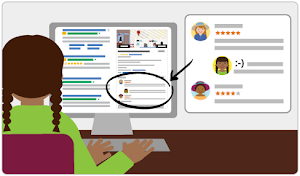
Reviews are a major part of that interaction. Read them. Respond to them. Thank customers for positive reviews, and respond professionally to negative reviews when they happen. Your response is not only for the reviewer; it is also for every future customer who reads it.

Do not buy reviews, trade incentives for reviews, or use fake reviews. Google and regulators have increased their focus on fake and misleading reviews, and the risk is not worth it. The best long-term strategy is simple: serve customers well and make it easy for real customers to leave honest reviews.

Add Photos and Keep Them Fresh

Photos still matter. A profile with quality, current photos is more useful and more convincing than a bare listing.

Add photos of your storefront, office, team, products, services, completed projects, vehicles, signage, or anything else that helps customers understand who you are and what you do. For many small businesses, even a modest number of good photos can make a profile feel more trustworthy and active.

Highlight Products, Services, Offers, and Updates

Depending on your business category, Google Business Profile may allow you to add services, products, offers, posts, menus, booking links, messaging, and other useful details.

Use the features that make sense for your business. A restaurant may benefit from menus and specials. A contractor may benefit from service descriptions and project photos. A retail shop may benefit from products and offers. A professional service business may benefit from clear service categories and a strong business description.

The goal is not to fill out features just for the sake of filling them out. The goal is to give customers the information they need to choose your business.

Keep Your Profile Maintained

One of the biggest mistakes businesses make is claiming a profile once and then forgetting about it.

Your Google Business Profile should be reviewed regularly. Check your hours, photos, services, contact information, website link, reviews, and business description. Watch for suggested edits or incorrect information. Make sure your profile still reflects your business accurately.

Google changes features over time. Some tools appear, change, or disappear. That is another reason to review your profile often and make sure it is still working for you.

Do It Today!

There is much more that could be said about Google Business Profile, but the most important advice remains the same:

Claiming, verifying, completing, and improving your Google Business Profile is one of the most important steps a local business can take to maximize results from Google Search and Google Maps.

Claim it Now!

Are Your Emails to Gmail Accounts Bouncing?

If you send emails to Gmail users for your business, this information is extremely important. It could mean the difference between your messages hitting the inbox or bouncing back with an error.

Don't think it is important? Consider this: In the United States, Gmail holds a 50% market share for email clients! If your emails aren't getting through to Gmail, you are missing half your audience.

Google has significantly tightened its security rules to combat spam and phishing. If your domain isn't properly authenticated, Google will block or bounce your legitimate emails.

To keep your emails delivering smoothly, Google requires three core authentication methods to be set up in your domain’s DNS (Domain Name System) settings: SPF, DKIM, and DMARC.

The Big Three: SPF, DKIM, and DMARC

Think of these three records as a digital passport, a verified signature, and an instruction manual for your emails.

  1. SPF (Sender Policy Framework): This is a list published on your domain that specifies exactly which mail servers and IP addresses are authorized to send email on your behalf.
  2. DKIM (DomainKeys Identified Mail): This adds a secure, cryptographic signature to the header of every email you send. It proves that the email truly originated from your domain and wasn't altered in transit.
  3. DMARC (Domain-based Message Authentication, Reporting, and Conformance): This is the missing puzzle piece that ties SPF and DKIM together. A DMARC policy tells receiving servers (like Gmail) exactly what to do if an email fails SPF or DKIM checks. You can set it to do nothing but report it (p=none), quarantine it to the spam folder (p=quarantine), or reject/bounce it entirely (p=reject).

Google requires a minimum DMARC policy of p=none for bulk senders, but having it active is essential for baseline delivery.

What You Need to Do Next

Check your records: Reach out to your email or web hosting provider to see if your domain has active SPF, DKIM, and DMARC records.

For many years, when new domains were registered, systems might have automatically generated a basic SPF record, but rarely a DKIM or DMARC record. Today, you must actively ensure all three are configured correctly.

Because modifying DNS records requires precision, it is highly recommended to have a professional handle it to avoid accidentally disrupting your website or current email flow.

If you are a WebWise Design & Marketing client, and you are experiencing email bounces, please reach out to us. We can review your current DNS setup, implement the necessary SPF, DKIM, and DMARC updates, and make sure your business communications keep landing exactly where they belong, in the recipient's inbox.

Two quick ways to jump-start your new website in Google SERPS

1. Use Google Ads

We always suggest to our new clients that they use Google Ads to jump-start the new web presence. (It is also a good marketing tool for a redesigned website or doing a new product launch, among other things.)

An inexpensive Google Ads campaign gets your name, along with a description you control, at or near the top of search results pages and can keep it there while your individual pages get indexed and, if they are created properly with good content, starting earning their way up the organic listing rankings in Google.

2. Use X (Formerly Twitter)

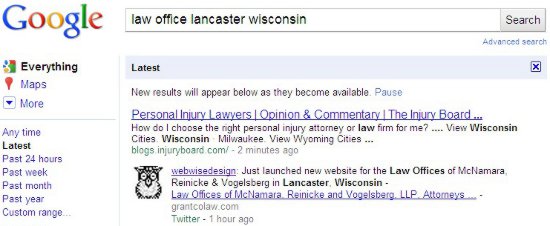
We announce all new websites we launch for our clients. Those “posts” show up in Google very quickly. In fact, it happens sometimes in seconds and always in a very few minutes. The URL in that tweet gets indexed as well. There is no waiting for Google to “discover” your website from a link on another website or from your sitemap.xml (ask your webmaster if you have a sitemap.xml). In the example, I did the search about 70 minutes after using Twitter to announce the launch.

Google SERP of Tweet

Even though we tweet about our client websites, we highly recommend that they, and others, use X to get news of their website, not only to those in the Twitter universe, but to Google as well. It only takes a quick tweet and delivers a lot of benefit.

Summary: Google Ads and X (Formerly Twitter), Two quick ways to jump-start your new website in Google search engine results pages.

Your Website Should Be Secure

For all practical purposes, Google is forcing the use of SSL and HTTPS on all websites! Prior to this, there was no need for you to purchase a SSL Certificate for your website and incur the expense of migrating your website from HTTP to the HTTPS protocol.

What is SSL

Chrome Secure treatmentSSL (Secure Sockets Layer) is a standard security protocol for establishing encrypted links between a web server and a browser in an online transfer of data. A SSL Certificate is necessary to create SSL connection. Having a SSL Certificate installed on a web server ensures that all data transmitted between the web server and browser remains encrypted.

Google says, “Beginning in July 2018 with the release of Chrome 68, Chrome will mark all HTTP sites as not secure.”

What Needs To Be Done

You must enable SSL for your website which is done through your hosting provider. The SSL Certificates (annual renewal) and implementation choices and costs vary depending on the hosting company and the plan you have. After the SSL Certificate is enabled, all links on your website needs to be migrated from HTTP to HTTPS protocol.

Please see our page, Google Says Your Website Needs to Be Secure for more details, or contact our office, 608-822-3750 or 800-281-9993 or email support@webwisedesign.com.