Search

Two Things You Can’t Ignore: Landing Pages and Quality Score

I am quite certain some of our clients, and others who take advantage of advertising using Google Ads, wonder why we frequently talk about landing pages and quality score. Well, they are simply two things you can’t ignore!

The experts at Google and elsewhere write about understanding the landing page experience, and it is important to know what they say about it. It is also important for anyone wanting to maximize their investment in Google Ads to use the advice they offer.

It today’s AI search world, landing page success relies heavily on message match. If a user searches for “same-day emergency dental implants,” your ad should say it, and your landing page headline must immediately echo it. When a page immediately validates the user’s intent above the fold, bounce rates plummet, and trust goes up.

How Landing Pages Dictate Quality Score

Your landing page accounts for a massive portion of your Quality Score evaluation. Google judges your Landing Page Experience based on concrete technical and behavioral indicators:

  • Mobile-First Design & Speed: Google places severe weight on mobile responsiveness and page load times. A single-second delay in mobile load time can drop conversions by up to 20%. If your page is slow, your landing page experience rating drops to “Below Average,” tanking your overall score.
  • Transparency and Trust: The page must clearly feature privacy policies, clear pricing/terms, contact information, and security signals (like reviews or certifications).
  • User Engagement: If users consistently click your ad and instantly hit the “Back” button to return to the search results page (known as pogo-sticking), Google notes that your page failed to answer their query.

What is Quality Score and Why it Matters: 

Quality Score (QS) is a 1-to-10 diagnostic rating Google assigns to your keywords. It measures how relevant and helpful your ad and landing page are to someone performing a search. It is determined by three core components:

  • Expected Click-Through Rate (CTR): The likelihood that users will click your ad.
  • Ad Relevance: How closely your ad text matches the intent behind a user’s search query.
  • Landing Page Experience: The value, speed, and clarity your website provides once they click.

The Financial impact: The “Quality Score Discount” 

Quality Score directly dictates your Ad Rank and your Cost Per Click (CPC). Google penalizes low-quality experiences and rewards highly relevant ones. If you have a poor Quality Score, you pay a steep penalty (Google calls it a Premium)  for traffic; if it’s high, you get a massive discount.

  • Rank: 10/10 ~50% Discount
  • Rank: 5/10 Baseline (No discount / no penalty)
  • Rank 1/10 400% Penalty

A low “Quality Score” forces you to over-bid just to maintain visibility, effectively bleeding your ad budget dry.

To succeed in today’s rapidly changing search world,  you can’t treat your landing pages as an afterthought to your keyword strategy.

Here is more from Google on Quality Score.

Don’t forget. When it comes to Google Ads campaigns,  there are “Two Things You Can’t Ignore: Landing Pages and Quality Score.”

P.S. Creating every page on your website with landing page experience in mind will serve you well in organic searches as well.
The Google Business Profile Is Critical for Businesses

If you do not already know, Google Business Profile is a free tool for businesses and organizations to manage their online presence across Google, including Search and Maps.

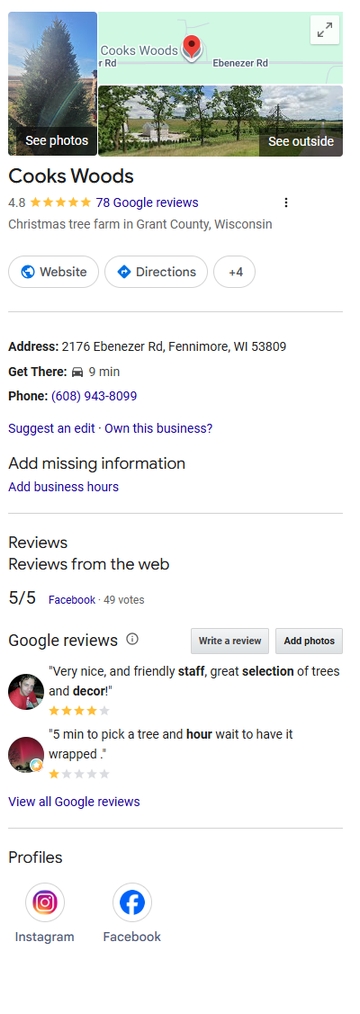
Cooks Woods Google Business Profile image"Claiming or improving your Google Business Profile is the singular, most important step you can take for your local business if you want to maximize results from Google Search." I wrote a version of that statement years ago, and it is still true today.
The concept is not new. Back in 2008, I wrote about using Google Maps Local Business Center to increase local traffic. Since then, the name has changed several times. What many of us knew as Google My Business is now Google Business Profile, and it has become one of the most important online marketing tools available to local businesses.

Since 2008, its name has changed several times and Google Business Profile is much more robust than it was back then. In 2008, there were roughly 173 million websites online. As I write this, there are over 1.9 "Billion" websites worldwide, with roughly 200 million active or maintained websites competing for attention. That makes prominent visibility in Google Search and Google Maps more valuable than ever.

A complete and accurate Google Business Profile gives your business a better opportunity to appear when people are searching for what you offer, especially when they are searching locally.

Manage your information:

First, it is imperative to claim and verify your Google Business Profile. If you have not done so, start at google.com/business.

Once you have access, be as complete and accurate as possible. Your business name, address, phone number, website, hours, service area, business category, products, services, photos, and description all matter.

It is especially important to keep your hours current. Google allows businesses to update regular hours, holiday hours, and special hours. Incorrect hours can frustrate customers quickly. Few things create a bad first impression faster than someone driving to your business only to find the door locked.

As with website SEO, Google uses many signals to determine which businesses to show in local search results. A complete, accurate, and regularly maintained Business Profile gives Google and your potential customers more confidence in your business.

Interact with customers:
Interact with customers via Google My Business

Your Google Business Profile is not just a listing. It is often the first interaction a potential customer has with your business.

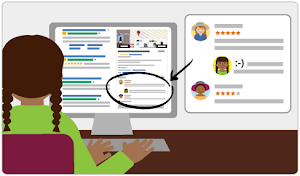
Reviews are a major part of that interaction. Read them. Respond to them. Thank customers for positive reviews, and respond professionally to negative reviews when they happen. Your response is not only for the reviewer; it is also for every future customer who reads it.

Do not buy reviews, trade incentives for reviews, or use fake reviews. Google and regulators have increased their focus on fake and misleading reviews, and the risk is not worth it. The best long-term strategy is simple: serve customers well and make it easy for real customers to leave honest reviews.

Add Photos and Keep Them Fresh

Photos still matter. A profile with quality, current photos is more useful and more convincing than a bare listing.

Add photos of your storefront, office, team, products, services, completed projects, vehicles, signage, or anything else that helps customers understand who you are and what you do. For many small businesses, even a modest number of good photos can make a profile feel more trustworthy and active.

Highlight Products, Services, Offers, and Updates

Depending on your business category, Google Business Profile may allow you to add services, products, offers, posts, menus, booking links, messaging, and other useful details.

Use the features that make sense for your business. A restaurant may benefit from menus and specials. A contractor may benefit from service descriptions and project photos. A retail shop may benefit from products and offers. A professional service business may benefit from clear service categories and a strong business description.

The goal is not to fill out features just for the sake of filling them out. The goal is to give customers the information they need to choose your business.

Keep Your Profile Maintained

One of the biggest mistakes businesses make is claiming a profile once and then forgetting about it.

Your Google Business Profile should be reviewed regularly. Check your hours, photos, services, contact information, website link, reviews, and business description. Watch for suggested edits or incorrect information. Make sure your profile still reflects your business accurately.

Google changes features over time. Some tools appear, change, or disappear. That is another reason to review your profile often and make sure it is still working for you.

Do It Today!

There is much more that could be said about Google Business Profile, but the most important advice remains the same:

Claiming, verifying, completing, and improving your Google Business Profile is one of the most important steps a local business can take to maximize results from Google Search and Google Maps.

Claim it Now!

PPC – Why You Should Bid On Your Business Name

Google AdWords Example AdThere are many excellent reasons to invest in a Google Ads, Bing Ads, Facebook and other PPC (Pay-Per-Click) campaigns. If you have read this blog or talked with us, you know we believe nearly every business should be taking advantage of PPC advertising. If you do nothing else, start a Google Ads campaign and bid on your business name.
Here are a few good reasons why you should bid on your business name.

  1. Branding - Improve Brand awareness - Value without paying for clicks
  2. Double Exposure - Display in PPC Ad and Organic listings
  3. Improve your CTR using Google AdWords "Extensions"
  4. You control your ad content
  5. Often, competitors are bidding on your name
  6. Make it easier for returning customers and other visitors to get to you

Start doing cost effective branding today by bidding on your business name.

Call us about starting a Google AdWords campaign. 1-800-281-9993 or 608-822-3750 

Two quick ways to jump-start your new website in Google SERPS

1. Use Google Ads

We always suggest to our new clients that they use Google Ads to jump-start the new web presence. (It is also a good marketing tool for a redesigned website or doing a new product launch, among other things.)

An inexpensive Google Ads campaign gets your name, along with a description you control, at or near the top of search results pages and can keep it there while your individual pages get indexed and, if they are created properly with good content, starting earning their way up the organic listing rankings in Google.

2. Use X (Formerly Twitter)

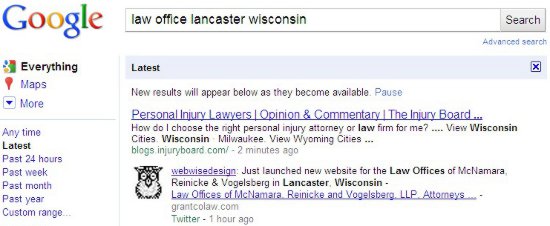
We announce all new websites we launch for our clients. Those “posts” show up in Google very quickly. In fact, it happens sometimes in seconds and always in a very few minutes. The URL in that tweet gets indexed as well. There is no waiting for Google to “discover” your website from a link on another website or from your sitemap.xml (ask your webmaster if you have a sitemap.xml). In the example, I did the search about 70 minutes after using Twitter to announce the launch.

Google SERP of Tweet

Even though we tweet about our client websites, we highly recommend that they, and others, use X to get news of their website, not only to those in the Twitter universe, but to Google as well. It only takes a quick tweet and delivers a lot of benefit.

Summary: Google Ads and X (Formerly Twitter), Two quick ways to jump-start your new website in Google search engine results pages.

Do you really need a mobile-friendly website?

Do you really need a mobile-friendly website? Google’s answer is, “…having a mobile-friendly website has become a critical part of having an online presence.“

It has been over a year since Google’s April 21, 2015 announcement that they would give preference to mobile-friendly websites in mobile search results. In the FAQ’s of the Webmaster Tools Blog, Google says, “pages designed for only large screens may see a significant decrease in rankings in mobile search results.”

Mobile-friendly websitesEleven months later on March 16, 2016, Google announced that they are, Continuing to make the web more mobile friendly. They are even more serious about it now. To help you understand how Google defines “mobile” and related terms here is a link to their Mobile Terms Glossary.

Another indication of how seriously Google is emphasizing the importance of having a mobile-friendly website is the rolling out of a new mobile-friendly testing tool on May 17, 2016. If you don’t know if your website is mobile-friendly, run the Google Mobile-Friendly Testing Tool.

Google also says, “If you haven’t made your website mobile-friendly, you should.” (The bold font was done by Google.) We urge you to take their words seriously. Do you really need a mobile-friendly website? If you want your website found by prospects and customers when searching with their phone or another mobile device, the answer is yes.

If your website does not pass Google’s Mobile Friendly Test, Call Us Now!
608-822-3750 or 800-281-9993

Portions of this page are reproduced from work created and shared by Google and used according to terms described in the Creative Commons 3.0 Attribution License.