We always suggest to our new clients that they use Google Ads to jump-start the new web presence. (It is also a good marketing tool for a redesigned website or doing a new product launch, among other things.)
An inexpensive Google Ads campaign gets your name, along with a description you control, at or near the top of search results pages and can keep it there while your individual pages get indexed and, if they are created properly with good content, starting earning their way up the organic listing rankings in Google.
2. Use X (Formerly Twitter)
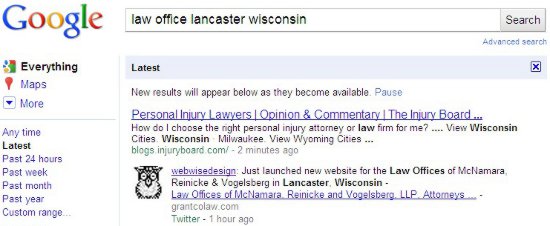
We announce all new websites we launch for our clients. Those “posts” show up in Google very quickly. In fact, it happens sometimes in seconds and always in a very few minutes. The URL in that tweet gets indexed as well. There is no waiting for Google to “discover” your website from a link on another website or from your sitemap.xml (ask your webmaster if you have a sitemap.xml). In the example, I did the search about 70 minutes after using Twitter to announce the launch.
Even though we tweet about our client websites, we highly recommend that they, and others, use X to get news of their website, not only to those in the Twitter universe, but to Google as well. It only takes a quick tweet and delivers a lot of benefit.
Summary: Google Ads and X (Formerly Twitter), Two quick ways to jump-start your new website in Google search engine results pages.
You may have noticed the increasing use of Social Media share buttons on the top or sides (eyes right) of website pages and blogs. Sharing is a big deal in the Social Media world; so big, it is often called the currency of Social Media. You can use Social Media sharing to your advantage even if you “Don’t Do Social Media.”
If Social Media is not part of your marketing strategy, you may think share buttons can’t be on your website. Actually, social sharing buttons can help create a presence on social media platforms as well as providing other benefits for your brand. Remember, email was the original social media, so you should always include a share via email button. Here are four reasons why you should include social media share buttons on your website.
Improve Customer Experience
Part of having an effective website is providing a good experience for your visitors. This includes actions that you may not typically take part in, such as sharing content to social media. If your readers want to share your pages or blog posts, making it quick and easy for them to share on multiple platforms will increase the likelihood that they will do so. A share is tantamount to an endorsement, so make sure your content is worthy.
Increase Brand Exposure
When your website visitor shares your content with their social network, the likelihood that each of that visitor’s followers has visited your website before is very slim, so that content is getting introduced to an entirely new group of people. While not every one of those followers may be interested in the content that user shared, they may use this opportunity to explore your website and find something that appeals to them. That’s why adding share buttons to your website will typically result in new visitors to your website and, hopefully, new customer prospects for your business.
Improve Reach To Your Target Market
You’ve worked hard to get informative and interesting content on your website or blog for your visitors to explore, but that’s only half the battle. Getting this content in front of the right audience is an entirely different story. Utilizing your customers as a way to target and reach out to new prospective customers is a quick and cost effective way to do this. When customers stumble upon something interesting, but feel it is not relevant to share on their social network, they might send it directly to a family member, co-worker, or a few friends. Research shows that direct messaging is the only thing that people do online more than social networking, so providing sharing buttons creates a great opportunity to gain new customers.
Influence SEO Benefits
Search Engine Optimization (SEO) is one of the most crucial elements of your website when it comes to organic (not-paid) traffic. Adding share buttons to your page can increase organic traffic. Google determines search results listings by using many ranking signals, among them are the number of times that content is shared, tweeted, liked, or posted to social media. While Google has long admitted to correlation but not necessarily causation, there is anecdotal evidence that social shares are helpful.
Social Media Share Buttons are important — Even if you Don’t Do Social Media!
If you run a small business, you are already more than busy. If you are not using Social Media for your business, you have likely considered it. Feeling there is not enough time nor extra money for expensive projects are generally two reasons Social Media gets shoved to the back burner for many small businesses.
Don’t wait! The benefits of a planned and well executed Social Media strategy are many. The good news is, you can get started with relatively small budgets of time and money.
How? First, don’t be afraid.
You have been using Social Media (Email) for years. Social Media is all about engagement, and that is what you have been doing when corresponding with clients, prospects and co-workers. How you do it with the different Social Media platforms and services varies, but it is basically communication between you and your customers. Really successful Social Media campaigns consist of two-way communication, not just pushing out information.
Second, don’t try to do too much.
We recommend you start with a monthly Newsletter and one other Social Media platform/service. Using one Social Media platform or service regularly and doing it well is far better than using two infrequently and poorly.
Here is a start up plan that will work for many of you.
The Social Media service(s) you choose may vary depending on your customers and prospects, but if you follow this relatively closely, you will be off to a good start. Before you start, read our blog post Five Keys to Using Social Media Successfully for Your Small Business.
Start with an email Newsletter using Constant Contact or similar service.
Many of you already send out monthly or quarterly newsletters or sales flyers. If you do, use Constant Contact or a similar service that has easy-to-use contact management tools and great reporting.
Twitter (unequivocally, the lowest barrier in cost/time effectiveness)
Start slowly.
Lurk at first – start following Twitter users in your line of business, your customers, your vendors
Read posts/tweets a couple of times a day, and reply or comment promptly
Tweet regularly and as often as possible.
There are tools to help with this. Our favorite is Hootsuite, which lets you post to multiple Social Media accounts, and schedule Tweets and posts. Try it. You will find it invaluable.
Then…
Blog – If you have a blog (and you should), post at least once a month, and more frequently if you can. Strive to post weekly.
If you are able to manage those effectively, then explore and think about:
LinkedIn (for some of you, but not all)
Facebook* (for some of you, but not all)
Google+ (for some of you, but not all)
YouTube Videos (for some of you, but not most)
Pinterest (for some of you, but not most)
That’s the Quick-Start Social Media Plan for Small Businesses. Do yourself a favor. Start today!
* Some, businesses can get by just using Facebook for their only Social Media presence if they have a decent following by actual paying customers, and time to communicate at least twice (more is better) a day. That said, you would be limiting the growth of your business.
Establish your reasons for using Social Media and focus your efforts toward those goals.
2. Understand which Social Media platforms your customers and prospects use
Learn about your target audience and where they are online so you can reach them.
3. Establish a plan to measure success – What is your expected ROI?
Understand how your money and time is spent for the best investment possible. Implement a plan to measure your effectiveness so you can make improvements.
4. Learn the best practices and etiquette of Social Media platforms
Marketing your business effectively through social media is different than using Facebook or Twitter for personal interests.
5. Allocate enough resources – Money, people, time
To use Social Media effectively for your business, invest in the personnel and time to do it right. Only going halfway won’t be adequate. Do it right or don’t do it at all.
If you are going to use Social Media for your business or organization, develop a Social Media strategy and implementation plan. Ineffective use of Social Media could do you more harm than good.
We at WebWise Design & Marketing are happy to help you sort out the Social Media platforms that are right for your business or organization, and how to use each in a manner that will produce results.
Give us a call today at 1-800-281-9993 or 608-822-3750. If you prefer, email us at .
It may be time for you to seriously consider advertising on Facebook. Now, I know many of you will say, “I don’t use Facebook,” or, “I don’t like Facebook.” You certainly have the right to feel that way. There are many things I don’t like about Facebook, but it is undeniable that many, many people do use and like it. Many of them are, or could be, your customers or prospects. According to CheckFacebook.com, as of April 16, 2011 there are 653,150,280 Facebook users globally. The number of users where it could impact most of our readers, here in the United States, is a healthy 154,869,960. Yes, you read it correctly. There are nearly 155 million Facebook users in the U.S. Now, not all of those users are active, but it is simply a market that should not be ignored.
Aside from the sheer number of people, what makes Facebook so attractive to advertisers? Facebook has a near plethora of statistics related to users, including demographics some marketers salivate over. They include age groups, birthdays, likes, interests, relationship, sex, education, occupation, connections (even friends of those connected with your page), and many more.
Ad targeting can be as simple or detailed as you want it. For example you could create an ad offering a 50% discount for anyone with a May birthday, and display that ad to any Facebook user that is female, between 18 – 35, and lives within 30 miles of your business. You may choose the days and times your ads display.
So, what does it cost? Well, that is entirely up to you. Facebook charges per click in a manner similar to Google AdWords and Microsoft adCenter. You may set a daily budget, and maximum cost per click. Our experience is that they noticeably try to get you to increase that budget, with increasingly higher suggested bids. Accordingly it takes some monitoring and tweaking to get the most clicks for your money. That seems to be especially true with small budgets. The bottom line on cost is that you can control it. You won’t spend more than you decide to budget.
I feel compelled to say, it is extremely important that you not only look at the reports Facebook Advertising provides, but you look closely at your website analytics. You will want to check the reports for “referring sites,” “bounce rate,” “navigation path,” and “time on site” results. If you are not seeing results there, or getting phone calls about your Facebook ad, you need to review why you are not reaching the goals you set for the ad campaign.
Creating the ads is relatively simple, but a bit challenging as you try to write an ad that conveys your message. You have some restrictions. The “Title” will be bold and blue, and can contain no more than 25 characters. Your ad must also include a working destination URL to a website (e.g.,www.examplewebsite.com) or a destination on Facebook like a Page or an Application. Your ad can have maximum size of 110 x 80 pixels. If you upload one larger, it will be automatically resized, but if it is not the same ratio as 110 x 80 it will be distorted. The body text may contain a maximum of 135 characters. You will find yourself rewriting several times to squeeze in what you want to convey. Facebook recommends you create multiple ads (that will not affect your cost) to find the one that works best.
So let’s recap to see if you should try Facebook Advertising.
Do you want your advertising in front of large numbers of self-qualified, very targeted, visitors to a specific page on your website?
Do you want to be able to control your monthly budget?
Do you want to choose which days and hours your ads display?
Do you want to quantify the amount you spend by seeing detailed reports?
My guess is the answer is yes to those questions.
The only caveat I’ll offer is that, as in all good things, it takes an investment of your time or that of a professional with experience. If you or your marketing professional, has experience, a proven track record using Google AdWords and other Pay-Per-Click platforms, and understand analytics, you will likely reach the goals you set for your Facebook advertising campaign. Of course, if you have time to learn, and put in the effort you may be successful as well.
Is Facebook Advertising a good fit for you?
Only you can make that decision. Of course, we are always happy to help. Call us! 1-800-281-9993

 You may have noticed the increasing use of Social Media share buttons on the top or sides (eyes right) of website pages and blogs. Sharing is a big deal in the Social Media world; so big, it is often called the currency of Social Media. You can use Social Media sharing to your advantage even if you “Don’t Do Social Media.”
 If you run a small business, you are already more than busy. If you are not using Social Media for your business, you have likely considered it. Feeling there is not enough time nor extra money for expensive projects are generally two reasons Social Media gets shoved to the back burner for many small businesses.