
The Google Business Profile Is Critical for Businesses
If you do not already know, Google Business Profile is a free tool for businesses and organizations to manage their online presence across Google, including Search and Maps.
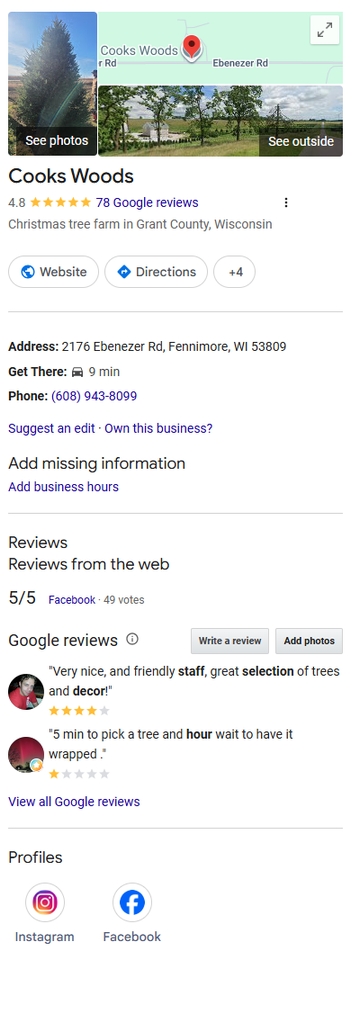 "Claiming or improving your Google Business Profile is the singular, most important step you can take for your local business if you want to maximize results from Google Search." I wrote a version of that statement years ago, and it is still true today.
The concept is not new. Back in 2008, I wrote about using Google Maps Local Business Center to increase local traffic. Since then, the name has changed several times. What many of us knew as Google My Business is now Google Business Profile, and it has become one of the most important online marketing tools available to local businesses.
Since 2008, its name has changed several times and Google Business Profile is much more robust than it was back then. In 2008, there were roughly 173 million websites online. As I write this, there are over 1.9 "Billion" websites worldwide, with roughly 200 million active or maintained websites competing for attention. That makes prominent visibility in Google Search and Google Maps more valuable than ever.
A complete and accurate Google Business Profile gives your business a better opportunity to appear when people are searching for what you offer, especially when they are searching locally.
Manage your information:
First, it is imperative to claim and verify your Google Business Profile. If you have not done so, start at google.com/business.
Once you have access, be as complete and accurate as possible. Your business name, address, phone number, website, hours, service area, business category, products, services, photos, and description all matter.
It is especially important to keep your hours current. Google allows businesses to update regular hours, holiday hours, and special hours. Incorrect hours can frustrate customers quickly. Few things create a bad first impression faster than someone driving to your business only to find the door locked.
As with website SEO, Google uses many signals to determine which businesses to show in local search results. A complete, accurate, and regularly maintained Business Profile gives Google and your potential customers more confidence in your business.
Interact with customers:
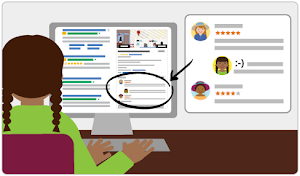
Your Google Business Profile is not just a listing. It is often the first interaction a potential customer has with your business.
Reviews are a major part of that interaction. Read them. Respond to them. Thank customers for positive reviews, and respond professionally to negative reviews when they happen. Your response is not only for the reviewer; it is also for every future customer who reads it.
Do not buy reviews, trade incentives for reviews, or use fake reviews. Google and regulators have increased their focus on fake and misleading reviews, and the risk is not worth it. The best long-term strategy is simple: serve customers well and make it easy for real customers to leave honest reviews.
Add Photos and Keep Them Fresh
Photos still matter. A profile with quality, current photos is more useful and more convincing than a bare listing.
Add photos of your storefront, office, team, products, services, completed projects, vehicles, signage, or anything else that helps customers understand who you are and what you do. For many small businesses, even a modest number of good photos can make a profile feel more trustworthy and active.
Highlight Products, Services, Offers, and Updates
Depending on your business category, Google Business Profile may allow you to add services, products, offers, posts, menus, booking links, messaging, and other useful details.
Use the features that make sense for your business. A restaurant may benefit from menus and specials. A contractor may benefit from service descriptions and project photos. A retail shop may benefit from products and offers. A professional service business may benefit from clear service categories and a strong business description.
The goal is not to fill out features just for the sake of filling them out. The goal is to give customers the information they need to choose your business.
Keep Your Profile Maintained
One of the biggest mistakes businesses make is claiming a profile once and then forgetting about it.
Your Google Business Profile should be reviewed regularly. Check your hours, photos, services, contact information, website link, reviews, and business description. Watch for suggested edits or incorrect information. Make sure your profile still reflects your business accurately.
Google changes features over time. Some tools appear, change, or disappear. That is another reason to review your profile often and make sure it is still working for you.
Do It Today!
There is much more that could be said about Google Business Profile, but the most important advice remains the same:
Claiming, verifying, completing, and improving your Google Business Profile is one of the most important steps a local business can take to maximize results from Google Search and Google Maps.
 There are many excellent reasons to invest in a Google Ads, Bing Ads, Facebook and other PPC (Pay-Per-Click) campaigns. If you have read this blog or talked with us, you know we believe nearly every business should be taking advantage of PPC advertising. If you do nothing else, start a Google Ads campaign and bid on your business name.
 National Small Business Week - May 3 - 9, 2026 is about more than recognition—it’s about connection.