
Why WebWise Pays So Much Attention to Google Search
Our clients and prospects hear us talk a lot about Google Search. Here is one reason why.

Talk with us. We’ll tell you more! 1-800-281-9993 or 608-822-3750
Our clients and prospects hear us talk a lot about Google Search. Here is one reason why.
Talk with us. We’ll tell you more! 1-800-281-9993 or 608-822-3750
 WordPress Content Management System (CMS) websites come with ongoing update costs that are easily overlooked. If you are like most of our clients, you don’t often think about, or pay much attention to, the backend of your website. WebWise Design & Marketing clients who choose to have a Security, Maintenance and Updates Plan may safely ignore updates needed to the functionality of their website as we take care of those tasks for you. Our security and maintenance plan includes monitoring and applying all WordPress security software updates, and all plugin updates. It also includes repairing any damage an update may cause to the website.
For those who do not have a Security, Maintenance and Updates Plan, please continue reading.
It is important to remember, simply ignoring or not applying WordPress and plugins is not an option. Updates must be applied, either by you or your web developer.
 I am sure many of you are thinking, “what the heck is a plugin and why do I need them?” According to the WordPress Codex, “Plugins are ways to extend and add to the functionality that already exists in WordPress. The core of WordPress is designed to be lean and lightweight, to maximize flexibility and minimize code bloat.” Plugins offer custom functions and features so that each website can be tailored to the website owner’s specific needs. Some examples of functions and features often added with plugins include calendars, photo sliders, forms, captcha for forms, anti-spam, navigation menus, security, and additional SEO features. Most interactive and dynamic aspects of a WordPress website are provided through the use of plugins. Some plugins (generally those with fewer features) are free to use. Sometimes, it is essential to use “premium” plugins that are sold as a license subscriptions that includes all code updates for a year. Note: these updates are for the code and subscriptions only; they do not include applying the updates to your website.
If you have read this far, I imagine you have a fairly good idea about what drives the hidden costs of security and maintenance updates, so I will confirm it. WordPress and plugins need to be updated frequently. Not long ago, we could say “periodically,” but unfortunately, “frequently” describes how often security and maintenance updates are required in today’s world. With every new WordPress release (there have been six so far this year), any website built with WordPress needs to have it updated. Of course, it doesn’t end with that simple update. Often, most if not all plugins used in building a website will have to release updates of their own, which will need to be applied to the website as well. Throughout the process of updating, one has to check to make sure the website is not negatively impacted by an update. In other words, the website must be checked and all functions tested to make sure the update didn’t break anything, and that the website is still displaying and working properly. That “checking’ is done for multiple devices, browsers, and operating systems.
I know some of you are asking, “What happens if I don’t do the security updates?” Well, there are many things that can happen as a result of not having the latest version of WordPress and plugins installed on your website. Here is short list of some possible consequences.
Websites created using WordPress need frequent back-end updates and maintenance that cannot be ignored. Updating WordPress, themes, and plugins takes time and money. Some plugins used require annual license/subscription renewal fees. Ignoring updates puts your website at risk.
Please see how WebWise helps mitigate the risk of your website getting hacked, and what you can do to make your website more resistant to hackers, by reading our Website Security For Content Management Systems blog post, as well as Secure Passwords Should Not Be Optional.
Of course, we are always happy to discuss how WebWise Design & Marketing can help you with anything in this post.
Do you really need a mobile-friendly website? Google’s answer is, “…having a mobile-friendly website has become a critical part of having an online presence.“
It has been over a year since Google’s April 21, 2015 announcement that they would give preference to mobile-friendly websites in mobile search results. In the FAQ’s of the Webmaster Tools Blog, Google says, “pages designed for only large screens may see a significant decrease in rankings in mobile search results.”
 Eleven months later on March 16, 2016, Google announced that they are, Continuing to make the web more mobile friendly. They are even more serious about it now. To help you understand how Google defines “mobile” and related terms here is a link to their Mobile Terms Glossary.
Another indication of how seriously Google is emphasizing the importance of having a mobile-friendly website is the rolling out of a new mobile-friendly testing tool on May 17, 2016. If you don’t know if your website is mobile-friendly, run the Google Mobile-Friendly Testing Tool.
Google also says, “If you haven’t made your website mobile-friendly, you should.” (The bold font was done by Google.) We urge you to take their words seriously. Do you really need a mobile-friendly website? If you want your website found by prospects and customers when searching with their phone or another mobile device, the answer is yes.
If your website does not pass Google’s Mobile Friendly Test, Call Us Now!
608-822-3750 or 800-281-9993
Portions of this page are reproduced from work created and shared by Google and used according to terms described in the Creative Commons 3.0 Attribution License.
So, you truly believe you know who your website audience is. Hopefully, you don’t believe that is enough. You still have to make and maintain a favorable connection with your prospective and current customers.
How do you do that? The answer is by using the other 4 Ws as they relate to online marketing.
 What — Refine what you want to say. Well-written, relevant, and grammatically correct copy is imperative. It doesn’t matter if it is a 1,200-word blog post, a 140-character Tweet, a product description, or a Google AdWords text ad with a 25-character headline and two 35-character description lines. Provide relevance and value.
When — The adage, “Timing is everything,” is true. Know when to send your message to your audience.
Where — You said you know your audience. Go where they are. If the majority of your website visitors get there by searching Google, you may want to consider Google AdWords (the type of campaign may depend on the devices your visitors use). If your audience is on Facebook or Pinterest you should be too, and consider advertising there. The same is true of other Social Media. If they listen to the radio, a short commercial always closing with your URL can be effective. Similarly, classified and other newspaper ads can be effective as well. Remember your “Who” drives your “Where.”
Why — Are you trying to . . .
The reasons why you are trying to reach your audience affects what you say, when you say it and where it is told.
Applying the 5 Ws as they relate to your marketing plan (You do have a marketing plan, do you not?) will reward you for your time spent. After all, simply identifying your audience is not enough.
Who is your audience? That is one of the very first questions we ask our new clients. The answer to that question is something that should be at the forefront of every business plan and marketing decision made for any business. Of course, identifying your audience is not enough. You need to know if your story is reaching them.
Many of you are going to say, “Of course, we know our audience” and I will grant it is likely that you do.
Assuming you do know your audience, are those in your target audience among your website visitors? Have you checked lately? You do review your website analytics regularly, do you not?
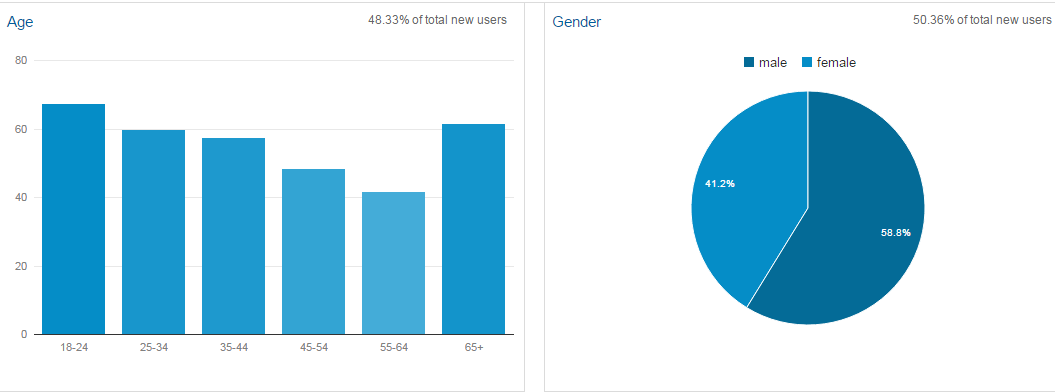
Here is a little checklist for you.
If you are not measuring, you are not marketing, and if you are attracting the wrong audience, you are not marketing at all!
Are those in your target audience among your website visitors?