Marketing

First Impressions Matter! What Does Your Website Say About Your Business or Organization?

What kind of first impression does your website make for your business, community, or organization?

First Impressions Matter! Not many of us would argue that. Unfortunately, when it comes to websites, many business owners, as well as community and organization leaders, don’t often think about how they make their first impression. The reality is that the first impression formed by your prospective customer or visitor is not likely to be made when the visitor walks up to your front door. It most likely will be made online, and in rapidly increasing instances, it will be made on a mobile device.

    • Does your website look as professional as you believe your business or organizations is?
    • Does your website look professional on phones and tablets as well as a desktop computer?
    • Is it attractive enough to make the visitor spend some time on it?
    • Can your visitor quickly determine what you offer?
  • Can your visitor quickly find your contact information?
  • Does it convey enough to make prospects want to contact you, or order online?
  • Can they call you with the touch of a button on their mobile device?

People are busier than ever, and their time is precious. The reality is, if your website is more than three or four years old, it likely does not meet Google’s current mobile-friendly standards. If that is the case, you are not making a good first impression when prospects see your website on a mobile device.

First Impressions Matter!

It Is Not Enough To Know Who Your Audience Is

So, you truly believe you know who your website audience is. Hopefully, you don’t believe that is enough. You still have to make and maintain a favorable connection with your prospective and current customers.

How do you do that? The answer is by using the other 4 Ws as they relate to online marketing.

Five WsWhat — Refine what you want to say. Well-written, relevant, and grammatically correct copy is imperative. It doesn’t matter if it is a 1,200-word blog post, a 140-character Tweet, a product description, or a Google AdWords text ad with a 25-character headline and two 35-character description lines. Provide relevance and value.
When — The adage, “Timing is everything,” is true.  Know when to send your message to your audience.

  • Look at your website and or Facebook analytics to see when most of your visitors are online.
  • If you have a newsletter, check to see when your subscribers are opening your email.

Where — You said you know your audience. Go where they are. If the majority of your website visitors get there by searching Google, you may want to consider Google AdWords (the type of campaign may depend on the devices your visitors use). If your audience is on Facebook or Pinterest you should be too, and consider advertising there. The same is true of other Social Media. If they listen to the radio, a short commercial always closing with your URL can be effective. Similarly, classified and other newspaper ads can be effective as well. Remember your “Who” drives your “Where.”

Why — Are you trying to . . .

  • create brand awareness?
  • drive traffic to your website?
  • reduce inventory of a particular product?
  • announce a new product or service?
  • build your newsletter subscriber list?
  • thank a returning customer?

The reasons why you are trying to reach your audience affects what you say, when you say it and where it is told.

Applying the 5 Ws as they relate to your marketing plan (You do have a marketing plan, do you not?) will reward you for your time spent. After all, simply identifying your audience is not enough.

Your Audience and Your Website Visitors – Are They the Same?

Who is your audience? That is one of the very first questions we ask our new clients. The answer to that question is something that should be at the forefront of every business plan and marketing decision made for any business. Of course, identifying your audience is not enough. You need to know if your story is reaching them.

Many of you are going to say, “Of course, we know our audience” and I will grant it is likely that you do.

Assuming you do know your audience, are those in your target audience among your website visitors? Have you checked lately? You do review your website analytics regularly, do you not?

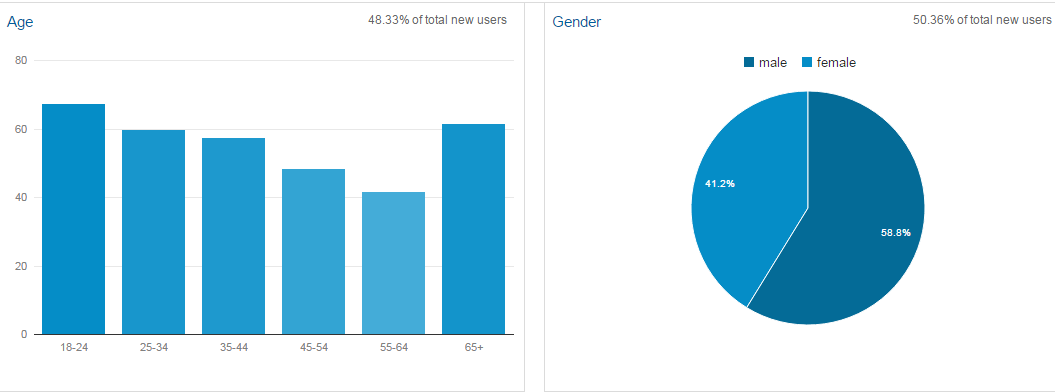
Google Analytics Demographics

Here is a little checklist for you.

  • Are you reviewing the demographics reports?
  • Are your visitors in your target age group?
  • If your target audience is a particular gender, are the majority of visitors that gender?
  • What is the ratio of “new” users and “returning” users?
  • Does that ratio coincide with your marketing plan?
  • Are the visitors to your website spending time on the pages you want them viewing?
  • Where do they go when they leave those pages?
  • Do they leave your website or do they look at more pages?
  • Is your conversion rate what you would like it to be?
  • Are visitors filling out a form or making an order?

If you are not measuring, you are not marketing, and if you are attracting the wrong audience, you are not marketing at all!

Are those in your target audience among your website visitors?

Increase Conversions – Improve Your Most Popular Pages

Improving the most popular pages on your website can increase conversions.  Take a look at the pageview data in Google Analytics (or other analytics provider) and make note of the top three pages (other than your home page) visited.

Improving ConversionsYou may not have intentionally created the most popular page on your website with the thought of it being specifically a landing page. More likely, it is a page you created some time ago that highlights services or products you offer. It may even be a nearly random blog post you wrote because you hadn’t published one lately.

Take a good look at your most visited web page, the time your visitors spend on the page, and where they go after viewing it.  Are they filling out your form, subscribing to your newsletter, or calling you?

  • Proof your page again. You may be surprised to find a typo or two. Fix them.
  • Update any outdated information.
  • If you don’t have a photo or visual, add one.
  • If you are talking about more than one topic, use sub-headers.
  • If you have other pages on your website related to the page topic, link to them.
  • List additional resources at the bottom of the page.
  • If you do not have a “Call to Action” on your page, add one.

Improving your most visited pages gives you more chances of increasing conversion rates.

Learn more about increasing conversions by calling us today!

1-800-281-9993 or 608-822-3750

Don’t feel like talking today? Use our convenient contact form.


Is Your Website Ready For Visitors?

Is your website, the place you hope to convert prospects to customers, ready to receive visitors?

When we use links to our websites using Social Media, we essentially invite people to our website. When we invite people to our homes, we generally check to see if everything is in its place and that there is nothing seriously amiss. Is that true with your website? When was the last time you reviewed your website to see if it reflects your business and your products or services as they are today?

Here is a little check list to make sure your website is ready for visitors.

  • Know and state who you are, what you do, and the benefits of what you offer to your visitor.
  • Know who you would like to visit your website.
    • Knowing your audience is critical. If you believe your audience is everyone, you will likely fail.
    • Who are they? Why would they want what you offer? When would they want it?
  • Speak to your visitors from their perspective, not with an industry-speak sales pitch.
    • Explain that you know some of their challenges, and how they can benefit from your products or services. If possible, show some specifics.
  • Does your navigation present a clear and easy path to your most important content?
  • Is your contact and location information readily visible?
  • Is your website mobile friendly?

If your website looks as good as you would like, and you check off all the items in the list, your website should be ready for visitors.

Of course, we are always happy to help. Email or call us today! — 1-800-281-9993 or 608-822-3750