Marketing

Don’t Lose Your Place – Claim Your Google Places Page!

If you have claimed your Google Places page, please feel free to skip the rest of this. If you have not claimed your Google Places page. Do it! Better yet, talk with the people you trust most with your web presence about why and how. That may be someone on your staff, your webmaster, or your web marketing people. Oh, by the way, if they haven’t been telling you to use Google Local Business Center (before it morphed into Google Places) for the last few years, you should ask them why not.

Why is claiming your Google Place Page important? On April 20, 2010, while introducing Google Places, they said, “One out of five Google searches is related to location.” Seven months later, the frequency of local searches has surely grown.

Google says, “More people search for businesses online than anywhere else, so it’s important to make sure your business listing can be easily found on Google.com and Google Maps.” They obviously believe it, as demonstrated by their blog post, “Place Search: a faster, easier way to find local information.”

After you claim your page, you may enhance the Place Page for your business by adding photos, videos, tags, hours of operation, coupons, and even real-time updates like weekly specials. One of the “features” is “ Reviews by Google users” which presents a compelling reason to “claim” your business Places page. Business owners that claim their listing may respond to negative (and positive) reviews. Here are some guidelines for managing your listing.

When is your Google Places listing displayed? Your listing will display when someone does a search on Google Web Search, Google Maps, Mobile search, 1-800-GOOG-411 voice directory search, or Google Earth. On any of these services, a search directly for your business name and city, will most likely display your listing. If your listing is well crafted, searches for your business category or services will trigger a display of your listing.

There is a lot more to be said, but I’ll just close, by telling you, this is the most important local business search-related action you can take. Google Places is free, and you can easily claim and enhance the listing yourself. Invest a little time, and do this today!

Learn more about Google Places, and remember, Don’t Lose Your Place!

As always, feel free to post a comment or question, or call John at 1-800-281-9993 or 608-822-3750.

Effective SEO as simple as one, two, three….and four

Really good Search Engine Optimization is a complex process. That said, effective SEO can be as simple as one, two, three….and four. Do four reasonably simple things, and you can see your rankings in Google Search Page Results, aka SERPS, improve considerably.

So you want your web pages to get found well, and you don’t want to spend a lot of money or time to make that happen? Well, look no further.

If you have a webmaster, provide him or her with a title for each of your pages. The “title” should use keywords  describing the content on the page (that is, keywords that potential visitors would search for hoping to find what you offer). Also provide your webmaster with a good headline (that is similar to, and contains the same keywords as the title) for each page. And of course you need some text describing what you offer. Obviously, that text should contain the same keywords near the start of the first paragraph. Your webmaster should be able to take it from there.

If you maintain your own website, then you should pay attention to this list.

  1. Title tag
  2. <meta> description tag
  3. Page header <h1> tag
  4. Well-written text

For those of you who don’t know what those four items are, I’ll describe them.

1. The <title> tag defines the title of the document.

The title element does the following:
Defines a title in the browser toolbar (displayed at the very top of your browser)
Provides a title for the page when it is added to favorites
Displays a title for the page in search-engine result

2. The <meta> description tag provides a description of the HTML document (your web page). The <meta> description will not be displayed on the page, but Google will display (most of the time) the information in search results, and just as, if not more, importantly uses it as one of the “signals” in determining how highly your page will rank.

3. The header <h1> tag contains the “headline” for the page (also used as a Google “signal”)

4. The first sentence of the first paragraph should contain the same keywords. (also used as a Google “signal”)

As I said, basic SEO is as simple as one, two, three….and four. Do remember to do them for each of your pages. Of course there is much more you could, and should, do. If your webmaster isn’t doing those basic four things for you, tell him you would like to pay him or her for doing so, as it does take some time to do it right. In this case a little time and or money spent will reward you with higher search rankings.

Two quick ways to jump-start your new website in Google SERPS

1. Use Google AdWords

We always suggest to our new clients that they use Google AdWords to jump-start the new web presence. (It is also a good marketing tool for a redesigned website or doing a new product launch, among other things.)

An inexpensive Google AdWords campaign gets your name, along with a description you control, at or near the top of search results pages and can keep it there while your individual pages get indexed and, if they are created properly with good content, starting earning their way up the organic listing rankings in Google.

2. Use Twitter

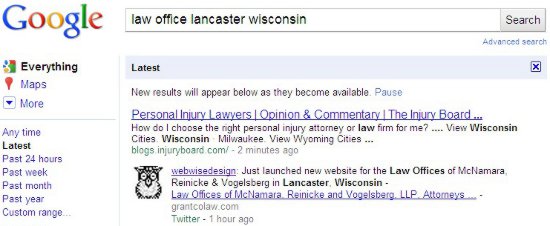
We announce all new websites we launch for our clients. Those “tweets” show up in Google very quickly. In fact, it happens sometimes in seconds and always in a very few minutes. The URL in that tweet gets indexed as well. There is no waiting for Google to “discover” your website from a link on another website or from your sitemap.xml (ask your webmaster if you have a sitemap.xml). In the example, I did the search about 70 minutes after using Twitter to announce the launch.

Google SERP of Tweet

Even though we tweet about our client websites, we highly recommend that they, and others, use Twitter to get news of their website, not only to those in the Twitter universe, but to Google as well. It only takes a quick tweet and delivers a lot of benefit.

Summary: Google AdWords and Twitter, Two quick ways to jump-start your new website in Google search engine results pages.

Is your community Web site Economic Development friendly?

Last night I had the opportunity to give a brief talk to the GCEDC – Grant County (Wisconsin) Economic Development Corporation monthly meeting in downtown Livingston, WI. I gave them a checklist to help them make sure their community web sites are Economic Development friendly. As you may suspect, this checklist can be applied to community and economic development sites anywhere. In fact, many of the items should be implemented on every web site.  Obviously, we talked in more detail about most of the items.

That said, in addition to the nice dinner served by Rebel’s Northern Exposure restaurant, and the gracious hospitality of our Livingston hosts and that of Ron Brisbois, Executive Director,  and John Murphy, President of GCEDC, here are the questions I posed last night:

Site Checklist:

  1. Is Economic Development prominently displayed in the navigation?
  2. Do you have text on the home page about Economic Development in your community?
    1. Specifically a paragraph with search terms that Economic Development professionals, business owners, job seekers, and relocating workers would use to find information.
  3. Are there links in that text that take visitors to the appropriate pages on your site?
  4. Does your Economic Development area include community profile information such as:
    • Transportation
    • Utilities
    • Emergency and Medical Services
    • Education/Employee Training
    • Major Employers
    • Taxes
    • Area Labor Force Information
    • Available buildings, sites, businesses
    • Housing Information
    • Community Contacts
    • Business & Industry Contact Information
  5. Is ALL of the information current?
  6. Have two people proofread your information for errors and accuracy?
  7. Do your Economic Development pages have the appropriate Title and META Description words?
  8. Do you have contact information on every page (in the footer) that interested parties will have in front of them after they print ANY of your pages?
  9. Do you have a Google (or other mapping service) Map/Directions page?
  10. Have you tried searching Google using the terms you believe prospects would use to find a community such as yours, when searching to locate a new/existing business, or  for personally relocating? If so, how did you do?

I also spoke briefly about using AdWords for Economic Development and gave them this very short list of AdWords Advantages:

  • Reach people who self-qualify themselves
  • Deliver them to the exact landing page that has content relevant to their search
  • Fully control your ad budget – Chose daily budget; change or stop it in seconds
  • See your ads on Google within minutes of creating them
  • Very flexible, pause, start, change, create ads in seconds or minutes

Quick tips that will get you results.