
Keep it Short and Sweet. Enough said
if you want it read.
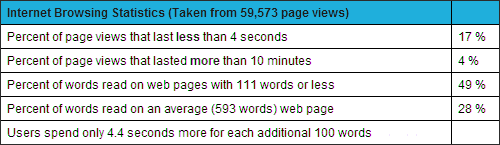
Enough said!
Thanks to Statistics Brain.
Source: The Associated Press
Research date: 4.28.2013
Enough said!
Thanks to Statistics Brain.
Source: The Associated Press
Research date: 4.28.2013
How long has it been since you reviewed your website SEO health? Here is a tried and true checklist to use.
 Page Title – The page title is the most important element of your page. A concise, well-written “Title” with your primary keywords at or near the beginning makes a world of difference to Google and the other search engines.
Description tag – These descriptions are often used as a part of the snippet shown in the search results. The description needs to be page specific, provide an overview of page content, and include the keyword search terms. New page = new description.
Headers – Generally, every page should have a header, coded as an H1. If at all possible, your header should contain the keywords used in the previous elements.
First paragraph – The first sentence is very important and should include your most important keywords. This paragraph may be the only paragraph your visitor reads before making that “should I stay”, or “should I go” decision.
Internal Links – When possible, your home page should include a short paragraph introducing each of the major areas on your website. Link to those internal pages using the keywords in their titles, descriptions and headers. Google loves that kind of linkage.
There you have it! Review your pages, make those changes, and enjoy improved SERPS (Search Engine Results Page) rankings.
 Most online shoppers are wary the first time they are visiting an estore. If you have an ecommerce website, building trust should be one of your priorities. Does your ecommerce website have the answers to these questions? If not, you have some work to do.
It all comes down to building trust. If your website doesn’t have the answers to the questions above, it doesn’t matter how great your products and/or prices may be. No trust. No sale!
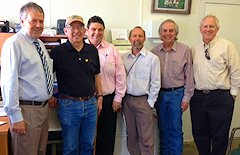 Monday, May 20 UW Professor Andy Lewis, Broadband & Economic Development Specialist at the Center for Community Technology Solutions, UW-Extension, led a group visiting the facilities at Uplands Cheese north of Dodgeville, Wisconsin. The group included three members of the Parliament of Victoria, Australia, who are members of the Rural and Regional Committee. They were Mr Paul Wellner (Chair), Mr Geoff Howard MP, and Mr Andrew Katos MP. They were accompanied by Lilian Topic, Executive Officer of the Rural and Regional Committee. I was privileged to participate in this event. Mike Gingrich of Uplands Cheese graciously acted as tour guide. He was a wealth of information and ended the tour with a tasting of the multiple-award winning Pleasant Ridge Reserve cheese.
The Rural and Regional Committee members were in the United States as part of their Inquiry into the Opportunities to Use Telecommuting and E-Business in Rural and Regional Victoria. After touring Uplands Cheese, the members of the committee, Andy, and I continued with discussion of the pros and cons of telecommuting and remote working. We also discussed entrepreneurship challenges in rural areas, including broadband access and costs. I related my experience of bootstrapping a small business and over seventeen years of running WebWise Design & Marketing in a small community in southwest Wisconsin. We discussed how a committee of dedicated members (including Andy and me) helped establish local dial-up Internet service availability in 1997 to nearly everyone in Grant County, WI. That local access grew from the city of Platteville only to covering nearly everywhere in Grant County in approximately six month’s time.
We concluded the day with a bit of a hike to a rocky point with a panoramic view overlooking Wyoming Valley, followed by dinner at a local restaurant, where our Australian visitors enjoyed their first taste of fried Wisconsin cheese curds. Thanks to Andy and Mike for making this wonderful exchange of conversation, information, and ideas possible.
First impressions matter. In today’s world, the first impression of your business is made by your website. Does your website present your business as professionally as you do when you are meeting someone for the first time? Before meeting or greeting prospective customers, most of us generally take a look in a mirror to make sure we don’t embarrass ourselves. We check our smile, our hair, and our clothes. We polish our shoes or in my case, boots. Sometimes we practice our greeting. Why? First impressions matter.
When was the last time you seriously looked at your website? How does it look? How does it read? How does it navigate?
First impressions matter.